Google Calendar-based Todo List
I made a lot of progress on my custom Home Assistant integration. I also bought a new sewing machine.

I would say I'm about half done with this project. The part that matters for the hallway tablet is probably done (aside from actually integrating it with my real Home Assistant instance, I've only tested in the dev environment so far).
So I need to work on actually mounting the tablet in the hallway soon, which includes wiring the cable through the wall since there's no outlet there.
The second part (which I have not started yet) is sending actionable notifications to my phone to remind me of today's tasks (and any overdue tasks) that I can mark tasks as completed without opening Home Assistant. This would replace my Tasker solution that integrates with Todoist.
I also have a minor update on my sewing adventures at the end.
Home Assistant Core is written in Python, so integrations are also written in Python. As such, I have been writing Python. I have touched Python before but not heavily ("poked it with a stick" is probably a more accurate description of my Python experience), so I've been getting used to the syntax where indentations matter and ternary expressions are backwards. I'm sure if I used Python regularly, I would appreciate the conciseness of the language, but coming from Java and Javascript as my main languages, I find it very, very strange.
Fortunately, the Home Assistant Core project has linting and auto-formatting, so it's been keeping me from writing awful code.
I did a lot of copy-pasta from existing integrations, mainly the Google Calendar and Todoist integrations.
Here's what I got working:
- Google authentication flow
- Google requires me to reauthenticate pretty frequently, I'm not sure if it's because I'm using a dev environment and starting/stopping the application frequently, or that the dev environment is not always connected, or if that's just how it is...
- Fetch Google Calendar events to display as Todo List items
- Fetch events for pending tasks from before this week (i.e. overdue tasks)
- Fetch events for pending AND completed tasks for this week where the week starts on Monday and ends on Sunday
- Fetch events for pending ad-hoc tasks for the next year after this week
- Update Google Calendar event date, title, and description when Todo List item changes
- Set Google Calendar event title to add or remove prefix "✅" when Todo List item is completed or uncompleted
- This is so Google Calendar is aware of the task status
- I look at my calendar through the Google Calendar UI, and it is obvious a task is done
- I can also change the task status through the Google Calendar UI by manually adding or removing the prefix
- An alternative way to track this extra data in an event is using "extendedProperties", but these are not editable directly in the Google Calendar UI and would rely on a third-party extension or app
- Set Google Calendar event date to today when Todo List item for ad-hoc task is completed
- Create Google Calendar event for next ad-hoc task occurrence when Todo List item for ad-hoc task is completed
- Delete Google Calendar event when Todo List item for pending task is deleted (completed tasks cannot be deleted because they should be preserved as an audit trail)
What is an ad-hoc task? It's a task that happens as needed or when we feel like it, but I still want a reminder to do it at some minimum frequency so it happens eventually. (I'm sure there's a better term to describe this scenario; if you know of one, please let me know!) To configure this in Google Calendar, I create an event that has a custom recurrence rule that ends after 1 occurrence. This allows the event to only show up once on the calendar and is a unique configuration that my Home Assistant integration can detect. Normal one-time events would not have a recurrence rule. And normal recurring events would never end or end after more than 1 occurrence.
The most challenging parts were authentication and ad-hoc tasks.
Authentication
Authentication was mostly challenging because I had to figure out how it works in the context of Home Assistant integrations. I've implemented an OAuth 2.0 flow before for Spotify API usage in a web app I made to help me sync my old music library to Spotify when Google Music shut down. But in that case, I owned all the code and endpoints, so I could implement it however I wanted (within reason). Home Assistant has a specific way to handle authorization for custom integrations. Luckily, I was able to copy most of it. But there will still trial and error to figure out which parts I needed and which parts I didn't.
The part I had to figure out on my own was how to select which calendar to use as the data source for my tasks. I plan to use two separate calendars for house tasks and personal tasks, so the hallway tablet will only show house tasks, but I can see personal tasks on my phone.
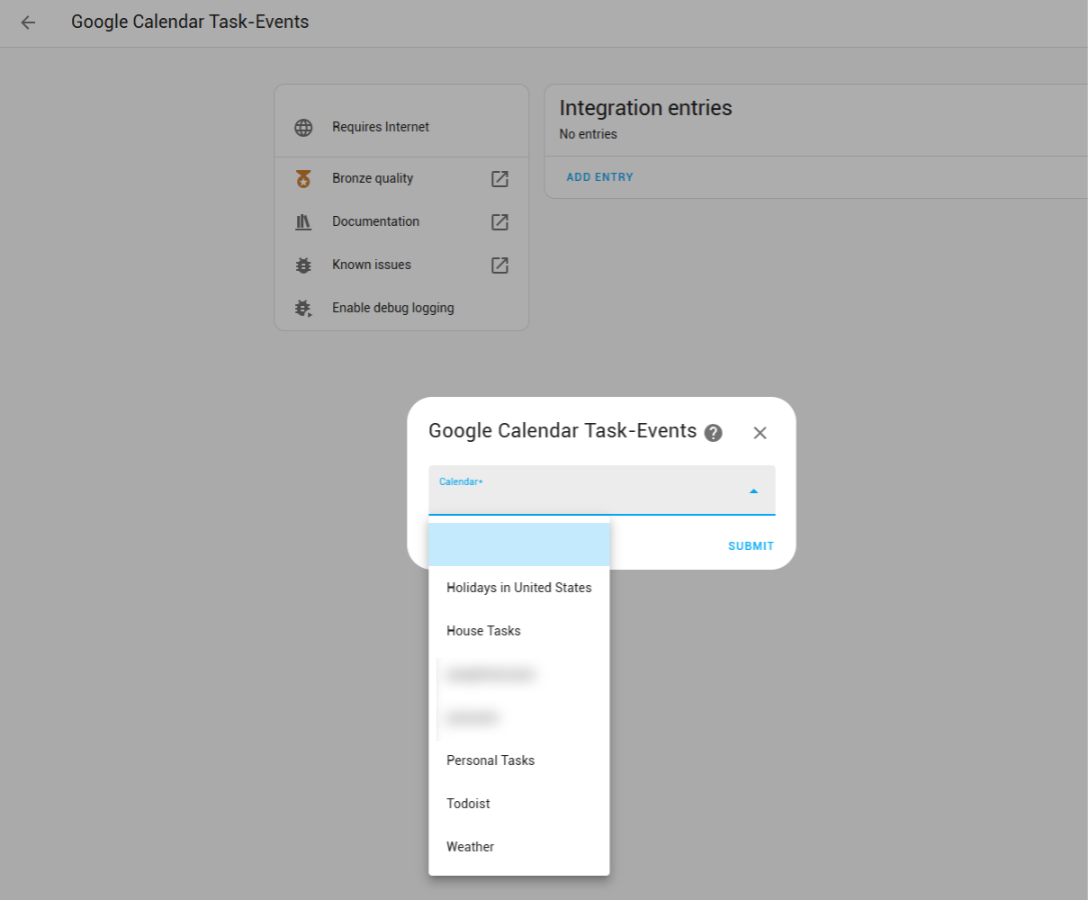
The last complication I had was handling reauthorization. This was mostly copied from other integrations. I'm not sure I fixed it entirely because sometimes I have to reauthorize twice to get it to work again... But it's good enough for now.
Ad-hoc tasks
I'm using the gcal sync library to interact with the Google Calendar API. Honestly, the reason I picked it is because the Home Assistant Google Calendar integration was using it. I could've just interacted with the REST API directly, since the API is small and I'm only using a few methods, and I'm not utilizing the "sync" functionalities of gcal sync. But the library did everything I needed it to do.
To represent an ad-hoc task, I originally tried adding it as "config" in the description. Something like:
{ "next_due_after": [30, "days"] }I also tried wrapping it in HTML comment tags so it's not visible:
<!--
{ "next_due_after": [30, "days"] }
-->
That was fine in Home Assistant because it renders the description as Markdown, so the checkbox list does not display it but it's displayed when you edit. However, this made it completely hidden from the Google Calendar UI. So I tried other hacks like checking for a JSON string in the source description, and wrapping it in comment tags in the Todo List item description, then remove the comment tags before saving. It kind of worked. But the hard part was querying for these tasks. In short, there is no way to reliably fetch only the ad-hoc tasks. And I didn't love seeing config in the description.
So then I got the idea of using a special recurrence rule for ad-hoc tasks. Except you still can't query for them directly. But at the very least, I can query for all base recurring events (not every instance of recurring events) and one-time events within a reasonable range (i.e. one year), then filter them based on the recurrence rule. Using a recurrence rule also works out well because I can throw it directly into datetime.rrule.rrulestr() to calculate the next date.
Then I encountered an issue with gcal sync.
The library uses a ListEventsRequest that always requests recurring events to be expanded as single events. Single events have the recurring event's id (if it's an instance of a recurring event), but not the recurrence rule. And to determine if an event represents an ad-hoc task, I needed to access to the recurrence rule.
class ListEventsRequest(SyncableRequest):
    """Api request to list events."""
    .
    .
    .
    def to_request(self) -> _RawListEventsRequest:
        """Convert to the raw API request for sending to the API."""
        return _RawListEventsRequest(
            **json.loads(self.json(exclude_none=True, by_alias=True)),
            single_events=Boolean.TRUE,
            order_by=OrderBy.START_TIME,
        )
At this point, I explored if there were other libraries. But I'm also lazy and gcal sync almost worked.
Then I thought, the only thing that I need is the ability to exclude single_events=Boolean.TRUE when I'm fetching future ad-hoc tasks. Can I just extend ListEventsRequest?
The answer is yes-ish.
class ListRecurringEventsRequest(ListEventsRequest):
    """Api request to list events."""

    def to_request(self) -> _RawListEventsRequest:
        """Convert to the raw API request for sending to the API."""
        return _RawListEventsRequest(
            **json.loads(self.json(exclude_none=True, by_alias=True)),
        )
Is this good practice? My enterprise-software-developer gut says no. Extending ListEventsRequest itself is probably fine, but I'm also referencing _RawListEventsRequest which is named as an internal class although there's nothing preventing me from importing it. Given that this is just for personal use, I will just leave it for now. Although I may consider publishing my integration to HACS in the future. If I do, I should be better.
As I wrote this, I read through the documentation for Google Calendar Simple API, and I think it would do everything I need too. I saw this library before, but only looked at the simple examples, so I thought it had limited functionality, but alas I was wrong. Reading does wonders. So I might switch over to this later.
Also, recurrence rules are amazing!
When I first attempted to create my own task manager app, I used dayjs to write my own recurrence rule system. The system would allow you to define rules with a human-readable string like "every week on [mon, wed]" similar to how Todoist does it.
Josephine's monstrosity of a recurrence rule system
const ALL_DAYS = ['sun', 'mon', 'tue', 'wed', 'thu', 'fri', 'sat'];
const ALL_MONTHS = [
    'jan',
    'feb',
    'mar',
    'apr',
    'may',
    'jun',
    'jul',
    'aug',
    'sep',
    'oct',
    'nov',
    'dec',
];
const ALL_ORDINALS = ['1st', '2nd', '3rd', '4th'];

const scheduleWeekly = (prev, { interval = 1, days = [] }) => {
    const validDays = days.map((v) => ALL_DAYS.indexOf(v)).sort();
    if (!validDays.length) {
        return prev.add(interval, 'week');
    } else if (prev.day() >= validDays.at(-1)) {
        return prev.add(interval, 'week').day(validDays[0]);
    } else {
        let next = prev;
        do {
            next = next.add(1, 'day');
        } while (!validDays.includes(next.day()));
        return next;
    }
};

const scheduleMonthly = (
    prev,
    { interval = 1, months, dayOfMonth, dayOfWeek }
) => {
    let nextMonth;
    if (months) {
        const validMonths = months.map((v) => ALL_MONTHS.indexOf(v)).sort();
        if (prev.month() >= validMonths.at(-1)) {
            nextMonth = prev.add(1, 'year').month(validMonths[0]);
        } else {
            nextMonth = prev;
            do {
                nextMonth = nextMonth.add(1, 'month');
            } while (!validMonths.includes(nextMonth.month()));
        }
    } else {
        nextMonth = prev.add(interval, 'month');
    }

    if (dayOfMonth) {
        return nextMonth.date(dayOfMonth);
    } else if (dayOfWeek) {
        const validWeek = ALL_ORDINALS.indexOf(dayOfWeek[0]);
        const validDay = ALL_DAYS.indexOf(dayOfWeek[1]);
        const nextMonthDay1 = nextMonth.date(1);
        if (validDay < nextMonthDay1.day()) {
            return nextMonthDay1.add(validWeek + 1, 'week').day(validDay);
        } else {
            return nextMonthDay1.add(validWeek, 'week').day(validDay);
        }
    } else {
        return nextMonth;
    }
};

const print = (obj) => console.log(obj.format('ddd YYYY-MM-DD'));

// Test cases for weekly schedule
console.log('every week');
print(scheduleWeekly(dayjs('2025-01-06'), {}));

console.log('every week on [mon, wed]');
print(scheduleWeekly(dayjs('2025-01-06'), { days: ['mon', 'wed'] }));
print(scheduleWeekly(dayjs('2025-01-08'), { days: ['mon', 'wed'] }));

console.log('every 2 weeks on [mon, wed, fri]');
print(
    scheduleWeekly(dayjs('2025-01-06'), {
        interval: 2,
        days: ['mon', 'wed', 'fri'],
    })
);
print(
    scheduleWeekly(dayjs('2025-01-08'), {
        interval: 2,
        days: ['mon', 'wed', 'fri'],
    })
);
print(
    scheduleWeekly(dayjs('2025-01-10'), {
        interval: 2,
        days: ['mon', 'wed', 'fri'],
    })
);

console.log('every 4 weeks on [sun]');
print(scheduleWeekly(dayjs('2025-01-05'), { interval: 4, days: ['sun'] }));

// Test cases for monthly schedule
console.log('every month');
print(scheduleMonthly(dayjs('2025-01-05'), {}));
print(scheduleMonthly(dayjs('2025-01-31'), {}));

console.log('every month on [1st sun]');
print(scheduleMonthly(dayjs('2025-01-05'), { dayOfWeek: ['1st', 'sun'] }));
print(scheduleMonthly(dayjs('2025-02-05'), { dayOfWeek: ['1st', 'sun'] }));

console.log('every 2 months on [2nd fri]');
print(scheduleMonthly(dayjs('2025-01-05'), { dayOfWeek: ['2nd', 'fri'] }));
print(scheduleMonthly(dayjs('2025-02-05'), { dayOfWeek: ['2nd', 'fri'] }));

console.log('every [mar, jun, dec] on [day 5]');
print(
    scheduleMonthly(dayjs('2025-01-01'), {
        months: ['mar', 'jun', 'dec'],
        dayOfMonth: 5,
    })
);
print(
    scheduleMonthly(dayjs('2025-03-01'), {
        months: ['mar', 'jun', 'dec'],
        dayOfMonth: 5,
    })
);
print(
    scheduleMonthly(dayjs('2025-05-01'), {
        months: ['mar', 'jun', 'dec'],
        dayOfMonth: 5,
    })
);
print(
    scheduleMonthly(dayjs('2025-06-01'), {
        months: ['mar', 'jun', 'dec'],
        dayOfMonth: 5,
    })
);
I also spent like 10 minutes trying to find this old code. It wasn't on my computer in the folder I normally put my coding projects. I finally found them. In a Google Doc. LOL. I think I saved them there because I wrote it in a codepen or something because I was just doing proof-of-concept work.
In retrospect, implementing the system myself was literal insanity. Sure, it provides a lot of flexibility. Too much flexibility. It would certainly have been extremely buggy. I... didn't think to search if there's existing standards for recurrence. (Of course there are. How else would all the various calendar implementations do it??)
Example
Anyway, enough implementation details and tangents. I now present to you some screenshots to illustrate what I have accomplished.
Here's what my "House Tasks" calendar currently looks with the following recurrence rules:
| Task Name | Recurrence Rule |
|---|---|
| Cat: Clip Poshie's nails | every 2 weeks on Saturday |
| Cat: Clip Isa's nails | every 2 weeks on Saturday |
| Laundry: Bed blankets | every 4 weeks on Sunday |
| Laundry: Bed sheets | every 2 weeks on Sunday |
| Cleaning Routine: Living/Dining Room + Hallway | weekly on Monday, Thursday |
| Run dishwasher | every 30 days, once |
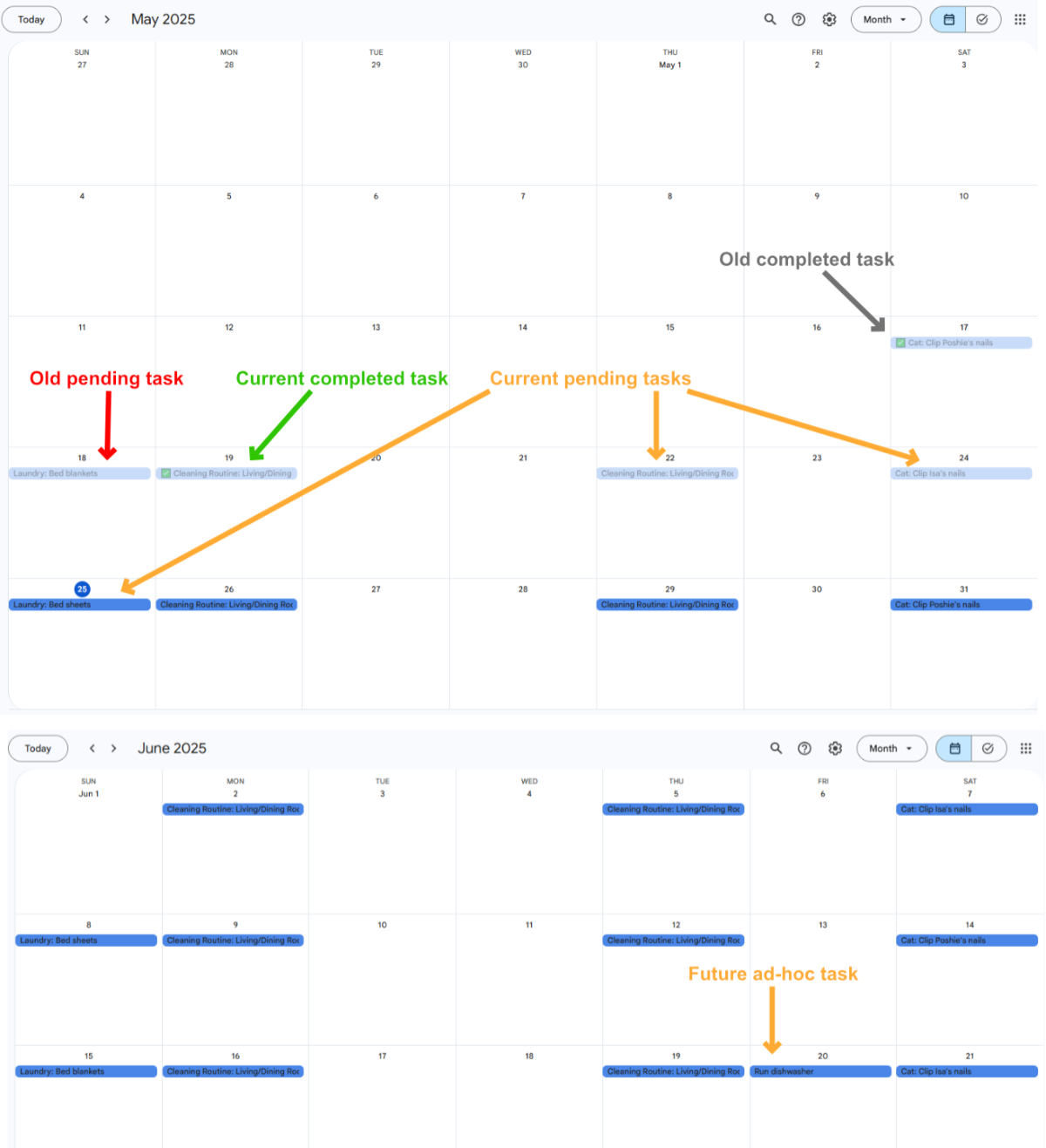
And this is how it gets displayed in Home Assistant as a Todo List. I'm just using the built-in Todo List UI for testing.
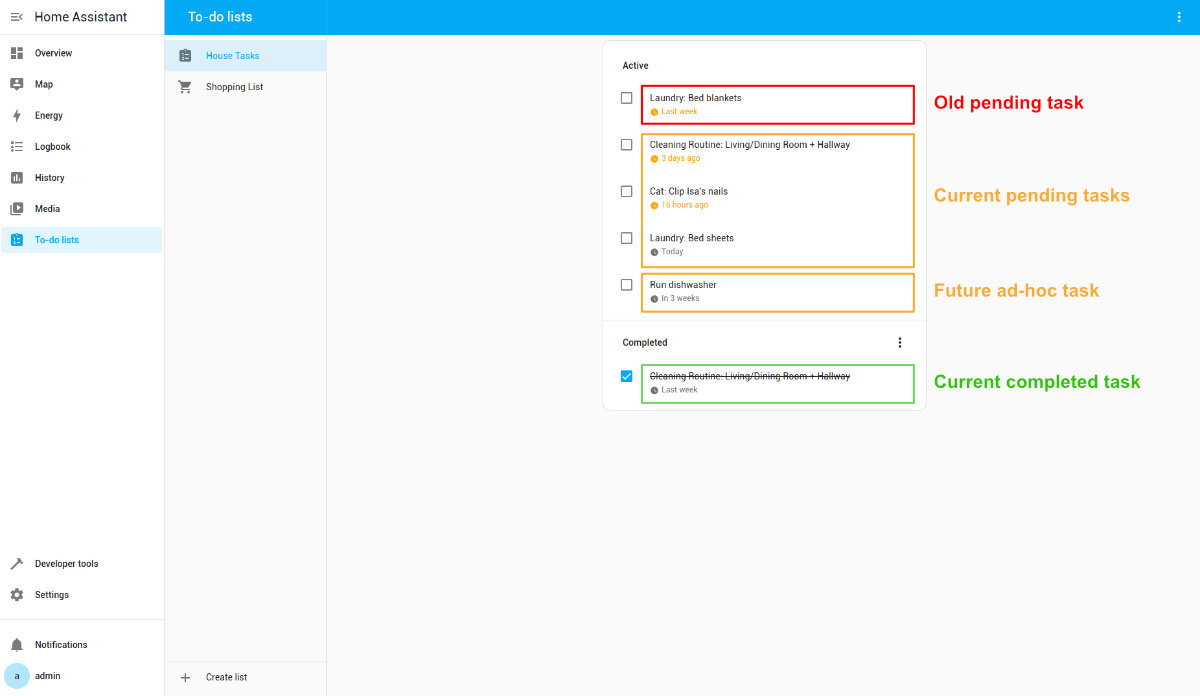
Note that old completed tasks and future pending tasks (that aren't ad-hoc tasks) are not displayed.
Current completed tasks continue to be displayed to boost morale ("wow look at all the chores I did this week!") and increase awareness for both residents of the household (if a task was done, the other person can see that it was done). I would also like a way to show old pending tasks that were completed this week for both of those reasons, but I'm not sure how I want to accomplish this yet.
I don't want to change the start date, since that tracks the original due date. I could change the end date to indicate it was done past the original due date. If I do that, should all tasks be handled that way? Will that be visually appalling when I look at my Google Calendar? (Although maybe being visually appalling will encourage me to do things on time.) This is most likely what I will do because it should still work with the current event querying logic, and the date can also be manually changed in the Google Calendar UI. I've considered before that overdue tasks should have their end date updated at the end of the day (or rather the start of my day at 8am, so I can still complete tasks after midnight). The only reservation I have about auto-setting the end date to today in either scenario is if I forget to mark a task as completed before I go to bed. I suppose I could build a custom dashboard card to allow overriding the completed date.
This coming week, I hope to get it tested on my real Home Assistant instance. And make progress on the notifications.
My new younger Brother
On an entirely unrelated note, I gave into the temptation and purchased a new sewing machine — a dazzling Brother NS80E (also sold as Baby Lock Jubilant). It was between this and a Juki HZL-LB5020 and after trying both in-store, the Brother was more pleasant to use in all aspects. In my very-inexperienced-sewist opinion, the Juki did not have any features or functionalities that the Brother didn't have and do better. The only reason to get it would have been to save money, but neither machine was cheap anyway. I wanted to buy something that I wanted to use.
I used it a little this weekend, and let me tell you, it was a joy to play with. I could never say that about my old sewing machine. I also couldn't say that about my real younger brother.