Hallway Tablet
I started setting up a hallway tablet with a dashboard for events and tasks. This was not part of my sabbatical plan, but I guess it is now.

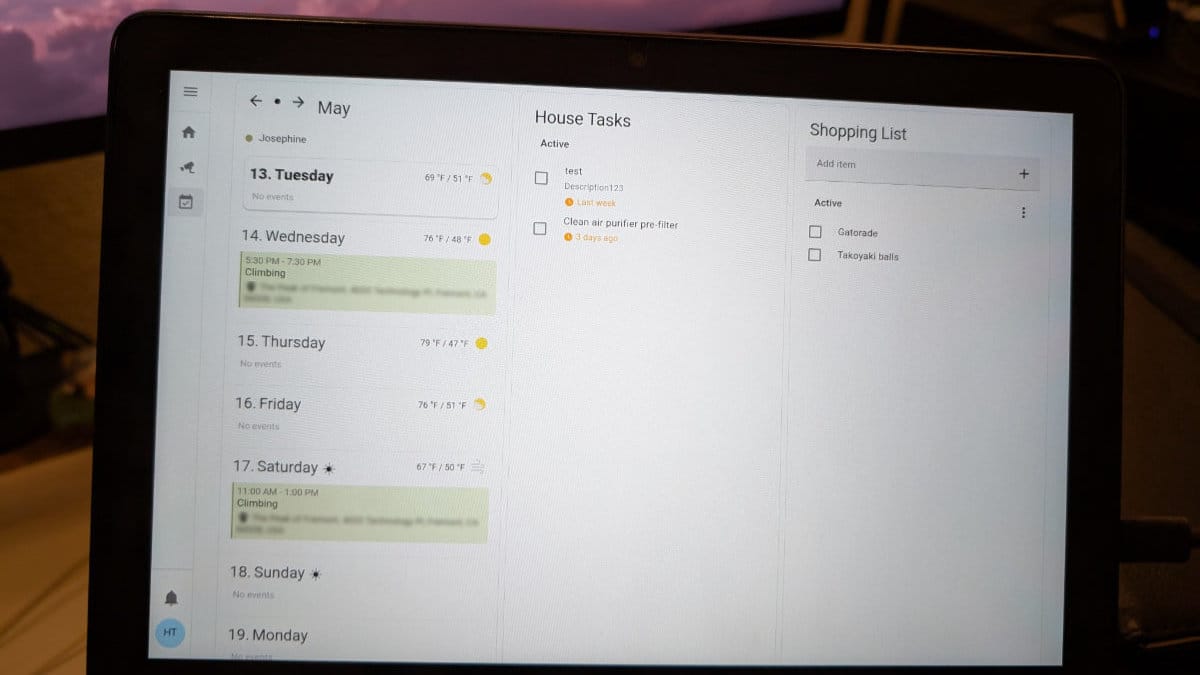
It has been one week. I did not make any progress on my goals.
But that doesn't mean I did nothing! I did sleep a lot. And I also did... "market research" for my game by sinking many hours into Capybara Go...
But most notably, I got distracted with a different project that I did have in my backlog, but wasn't high priority, which is mounting a tablet in the hallway to:
- Display events and tasks.
- Check and control the smart home devices.
- Check the cat cameras.
Of course it didn't make sense to work on this until I actually had a tablet. I was shopping around for a used Android tablet for under $100, and wasn't expecting to purchase one for a while. As part of my research, I asked a friend for recommendations, and they recommended an Amazon Fire tablet which happened to be on sale on Woot for $40 (refurbished).
...So I am now the owner of a Fire HD 10.
But why do I even need a hallway tablet to do these things?
Well, I don't. I can do all of these things on my phone, or on the computer. But I have a partner who is less tech-savvy, so this will be useful for him, and it's a fun project for me.
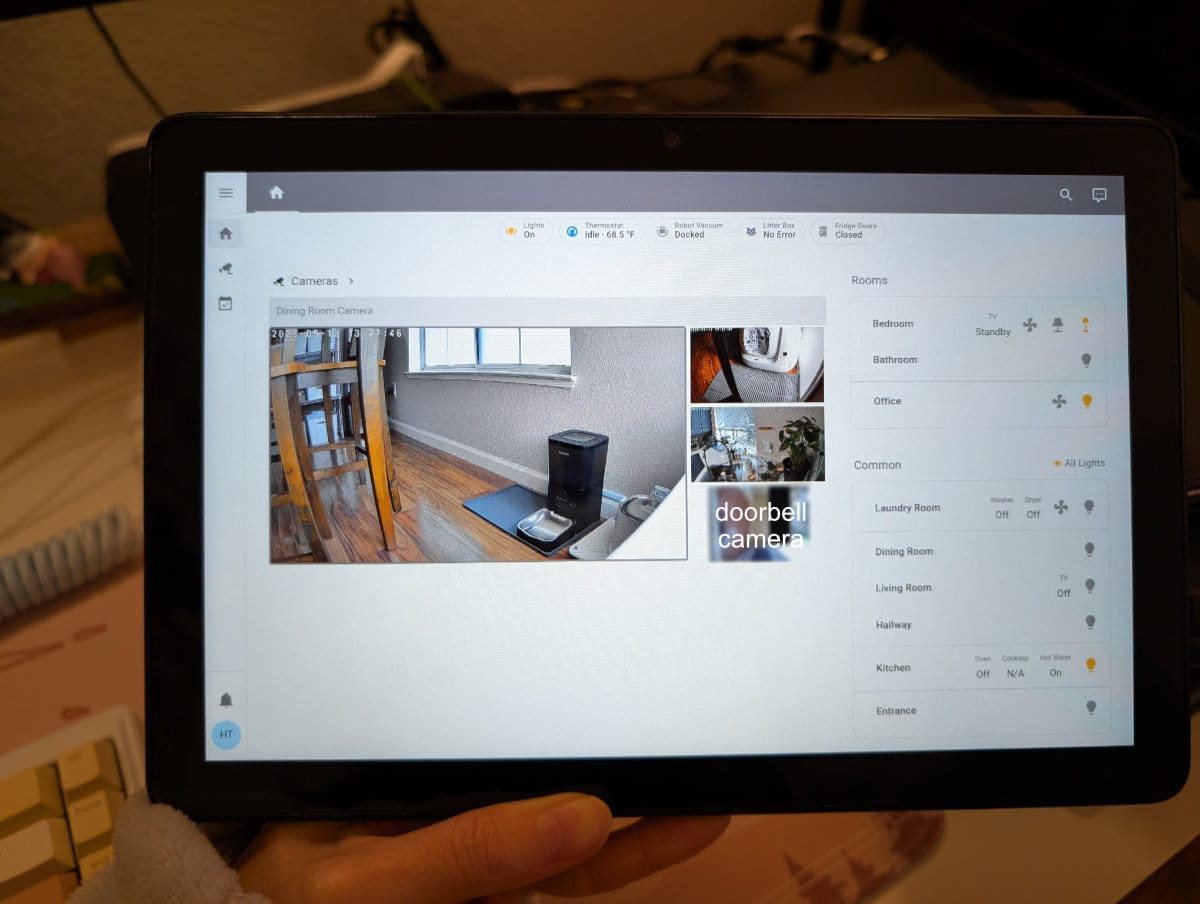
Check and control the smart home devices
Status: ✅ DONE
I've been using Home Assistant for a little over a year now. I used Google Home before, but Home Assistant has soooo much flexibility and customization. I still use Google Home for voice commands (I love being able to yell "ok google! start living room cleaning!" and have the robot vacuum start doing its thing) because the Home Assistant Voice devices are not mature yet, and I already have two Google Home minis that I don't want to go to waste.
I've tried my best to setup automations so my partner and house guests do not need to use a dashboard. Most devices have a physical switch/button of some sort. So having this available on the tablet doesn't add much value, but I'm using the same dashboard that I use on my phone (which I do use on a regular basis), so it's not any extra work for me.
The only new work I did for this was installing Fully Kiosk on the tablet to lockdown the tablet to the Home Assistant web app (not the Android app, which I also tried, but it seemed buggy). This also has motion detection using the front-facing camera so the screen only turns on if someone passes by.
Check the cat cameras
Status: ✅ DONE
I have three cameras inside the house to monitor my two cats, Poshie and Isa.
- "Dining room" camera points to Isa's eating area on the ground and the shared cat fountain.
- "Kitchen" camera points to Poshie's eating area on the counter (this is how we protect Poshie's food because Isa is a monchy girl and would eat Poshie's food if she could, but she doesn't know how to jump on the counter).
- "Living room" camera points to the litter box. I originally got this because Isa throws up like once a month, and she would always throw up in front of the litter box, so I could check the camera feed to see if and when she did it. Although, much to my dismay, recently she's been throwing up in other places.
These are all streamed to and recorded with Frigate, which was absolutely a pain in my entire existence to setup, and I can access the Frigate UI from Home Assistant.
My partner has more than once asked me, "can you check the cameras to see if Isa ate?". Having the camera feed available on the tablet will allow him to check it himself.
Display events and tasks
Status: 🚧 IN PROGRESS
How I currently manage events and tasks
I use Google Calendar for my events. When I have a shared event with my partner, or a personal event that I just want him to be aware of, I invite him as a guest so he gets an email, but he does not actively check the calendar, so he may forget.
For task management, I used to use Google Tasks, which was nice because I could mark tasks as done directly from my calendar. But I found the scheduling for repeating tasks does not work well if I ever need to reschedule a task. And it doesn't work well for keeping a history of completed tasks. And sometimes it wouldn't send me notifications??
Last year, I migrated to Todoist, which didn't help with keeping history (that's a premium feature), and came with some other quirks I don't like... like completing a task late would sometimes cause the next occurrence to be skipped.
For example, I have a task to clip Poshie's nails every two Fridays, but really I'm ok with completing it any day that weekend, but sometimes I am lazy or busy or Poshie is extra feisty and I do it a week late. Then when I complete the task, Todoist skips the next occurrence, so the one after will be three weeks later. Which isn't a huge deal since the difference between two and three weeks is whatever.
But for tasks with longer cycles, like deep cleaning the litter box every six weeks or so, if I do it a week late, if Todoist skips the next occurrence, so the one after will be 11 weeks later!
Maybe I'm just using Todoist wrong. But I find it be very opinionated in other ways like not being able to schedule things in the past. And only showing one occurrence in the future. Sometimes I want see ahead if there's any major tasks that are scheduled when I'm going to be busy or on vacation, so I can shuffle things around.
I also had to write a custom task with Tasker to send me phone notifications (because notifications are also a premium feature). So I feel like it's not quite the right tool for me.
Lastly, only I use this task management system. My partner does not. As a result, I'm only tracking my own house chores in the system. His chores are generally those that have obvious visual indicators that they need to be done (like taking out the trash), but others like cleaning the toilets is done whenever and with no history of the last time it was done. But if I have the means to, why wouldn't I setup a system that we can both use?
How I want to manage events and tasks
The final and hardest part of the hallway tablet project is displaying a dashboard with this week's events and tasks, as well as a shopping list.
Display
Displaying events was the easiest part. I added my calendar using the Home Assistant Remote Calendar integration with the "secret address in iCal format" and used the week-planner-card to display events. I also used kiosk-mode to hide the header. I added a bit of custom styling and played around a lot with the actual layout of the dashboard.
Layouts that I tried:
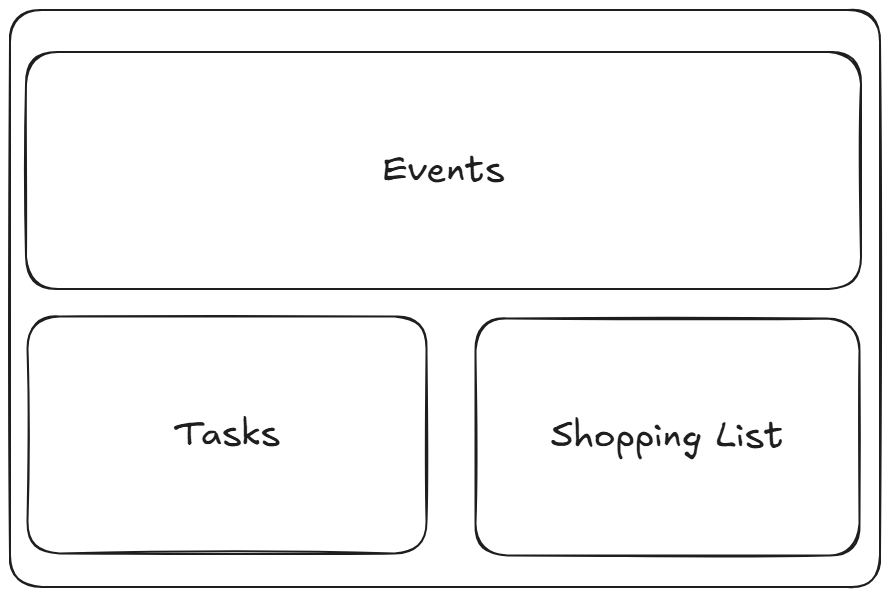
- If I were only displaying the events, having it span across the whole page looks great (it's like the week-view in Google Calendar). But I'm also displaying two to-do lists.
- The to-do lists also have limited vertical space before needing to scroll. I expect that the tasks list will have around 10 items at the beginning of the week.
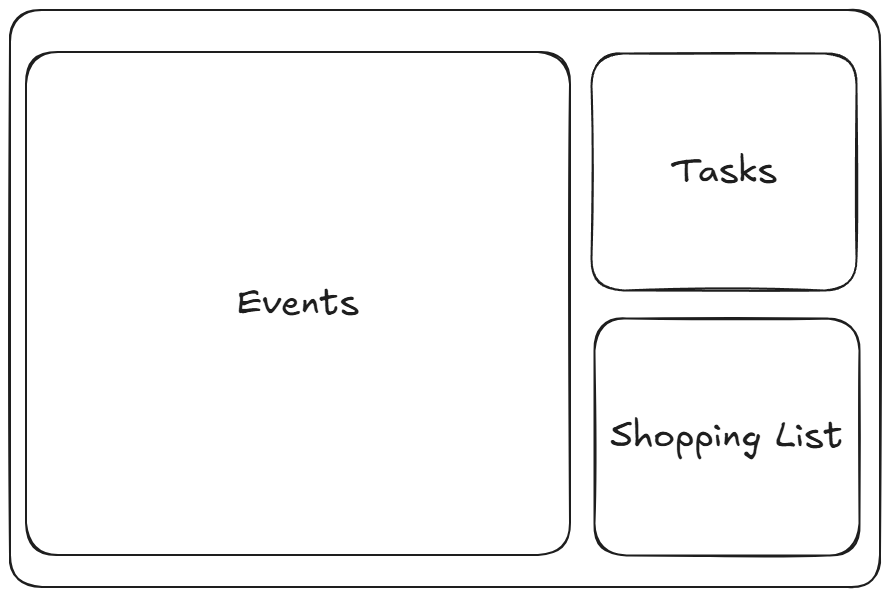
- This is probably worse than the first layout.
- The events takes up way too much space. I honestly care more about the tasks than the events.
- The to-do lists have even less space.
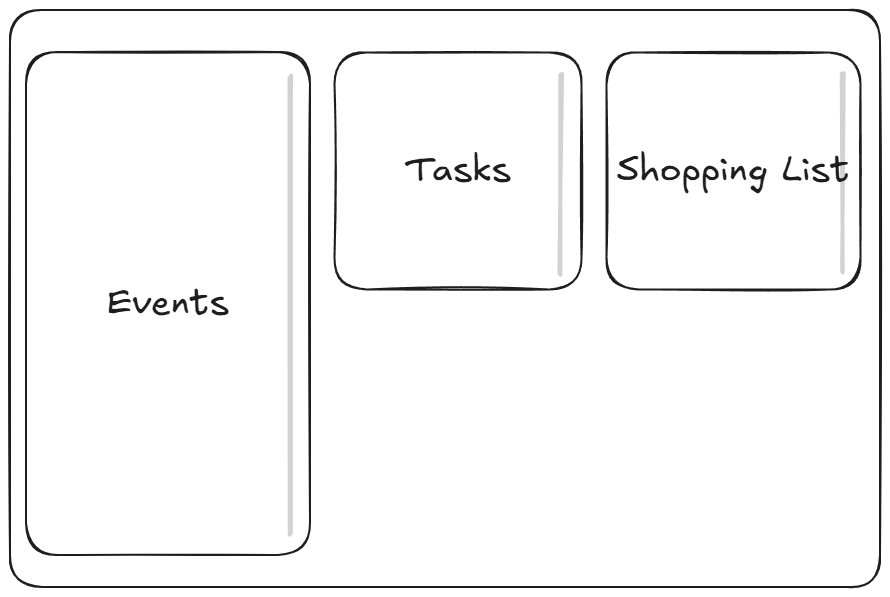
- I'm pretty happy with this layout.
- Events don't take up much space, and you can see most of the week without scrolling.
- Lots of space for the to-do lists.
- I added some styling so the card would have a max-height and scroll internally instead of having the whole page scroll. But not sure if that was intuitive.
Layout that I am currently using:
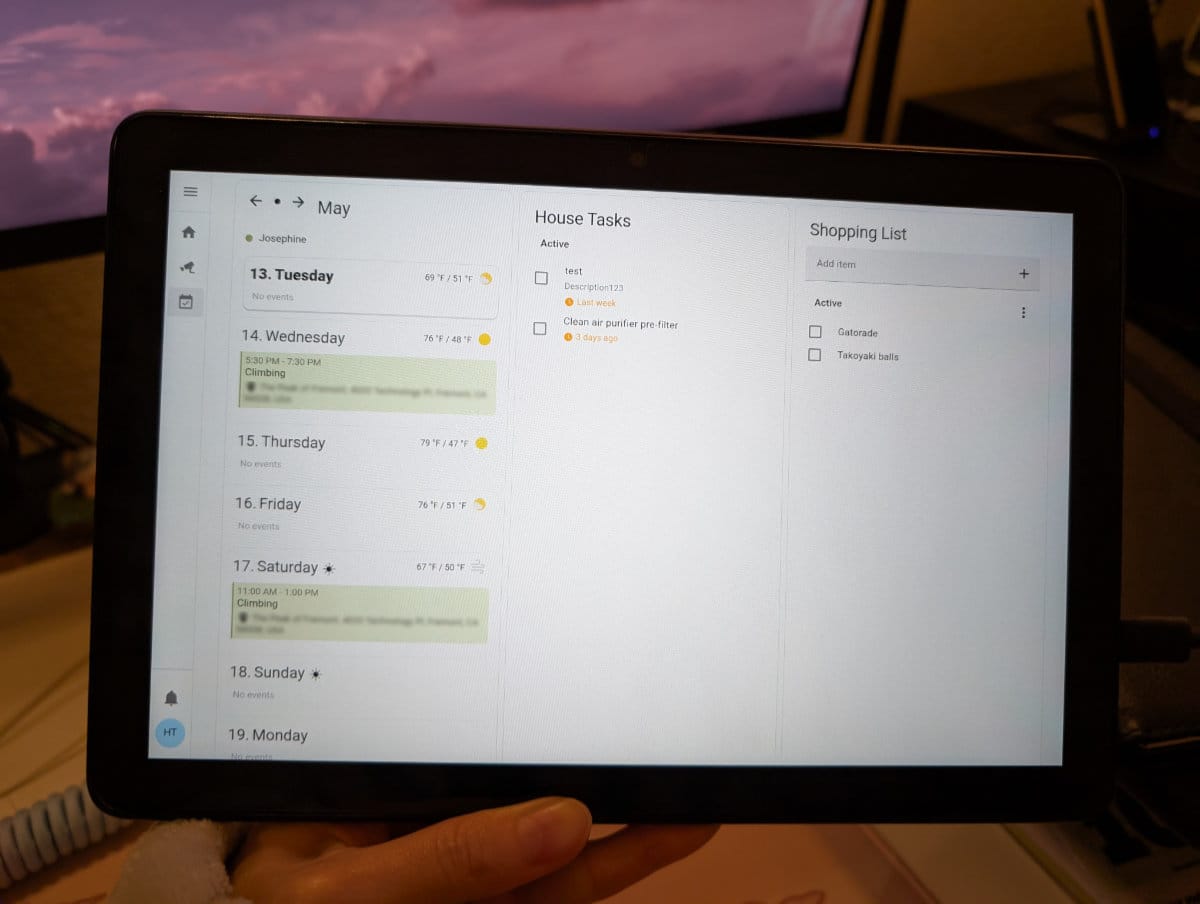
- Almost the same as the previous layout, but no card max-height and all cards have the same height. Less hacks with margins and padding.
- Everything scrolls together. I think this is more intuitive to use, but only time will tell.
Tasks
I'm using the Home Assistant Local To-Do integration for the to-do lists. This works perfectly fine for the shopping list. It sort of works for the tasks.
I was able to setup a new Google Calendar, added the same way as my events calendar, containing tasks as events. Then I created an automation to fetch events from the calendar, and create a to-do list item for each of them.
alias: Create to-do list items for House Tasks
description: Convert Google calendar events to Home Assistant to-do list items
triggers: []
conditions: []
actions:
    - action: homeassistant.update_entity
      data:
          entity_id:
              - calendar.house_tasks
    - action: calendar.get_events
      metadata: {}
      data:
          start_date_time: '{{ today_at() }}'
          end_date_time: '{{ today_at() + timedelta(days=7) }}'
      target:
          entity_id: calendar.house_tasks
      response_variable: response
    - repeat:
          sequence:
              - action: todo.add_item
                metadata: {}
                data:
                    item: '{{ repeat.item.summary }}'
                    due_date: '{{ repeat.item.start }}'
                target:
                    entity_id: todo.house_tasks
          for_each: "{{ response['calendar.house_tasks']['events'] }}"
mode: single
Automation YAML
I could tweak this a bit to make sure it doesn't create duplicates and only pulls for the current week (Monday-Sunday) instead of seven days.
But I shifted my focus to exploring the ability to update the calendar event upon completing a to-do list item. The idea is that competing an item will update the event title to show a checkmark or something in the title so if I look at it on my calendar, I can see that it's done. It would serve as a history of completed tasks. I could potentially change the event end date to indicate when the task was actually done (compared to when I was first reminded).
About six months ago, I actually did try to create a new task management system (my love-hate relationship with Todoist is not new). I tried using a Google App Script tied to a Google Sheets workbook. I didn't get too far, but I did learn how to use the Google Calendar API, which is helpful now.
The catch is that because I was using a Google App Script, I got to skip some of the authentication work. Now that I'm trying to integrate with Home Assistant, I need to setup the authentication flow properly. Home Assistant does let me make REST calls, but after about a day of tinkering, I came to the sad conclusion that it doesn't work with OAuth 2.0 because I didn't have a redirect URI to use.
This has led me down a rabbit hole of trying to create a custom integration, which I will write a separate post when I've made more progress.
(Here's to hoping I don't get distracted with yet another unplanned project! But honestly, that's the beauty of being on sabbatical. I can work on whatever I want, and stop working on it whenever I want.)