Todo List Notifications
I implemented todo list notifications via Home Assistant automation. And my bedroom closet shelf is falling down.
First, the good news. I got my new todo list notifications working. I have it set for both house tasks and my personal tasks, although only house tasks will be shown in the examples.
Next, the bad news. It came to our attention at around 1am on Friday evening that the shelf in our bedroom closet that was holding on by hopes and prayers was finally running out of hopes and prayers. It was already sort of collapsing before (it's been like that since we moved in), but it is actually for realsies falling down now. So I have yet another unplanned project, but at least this will force me to actually start doing some home DIY work.
Todo list notifications
Earlier in the week, I created calendar events for all the house tasks. Here's what the dashboard would look like at the beginning of the week.
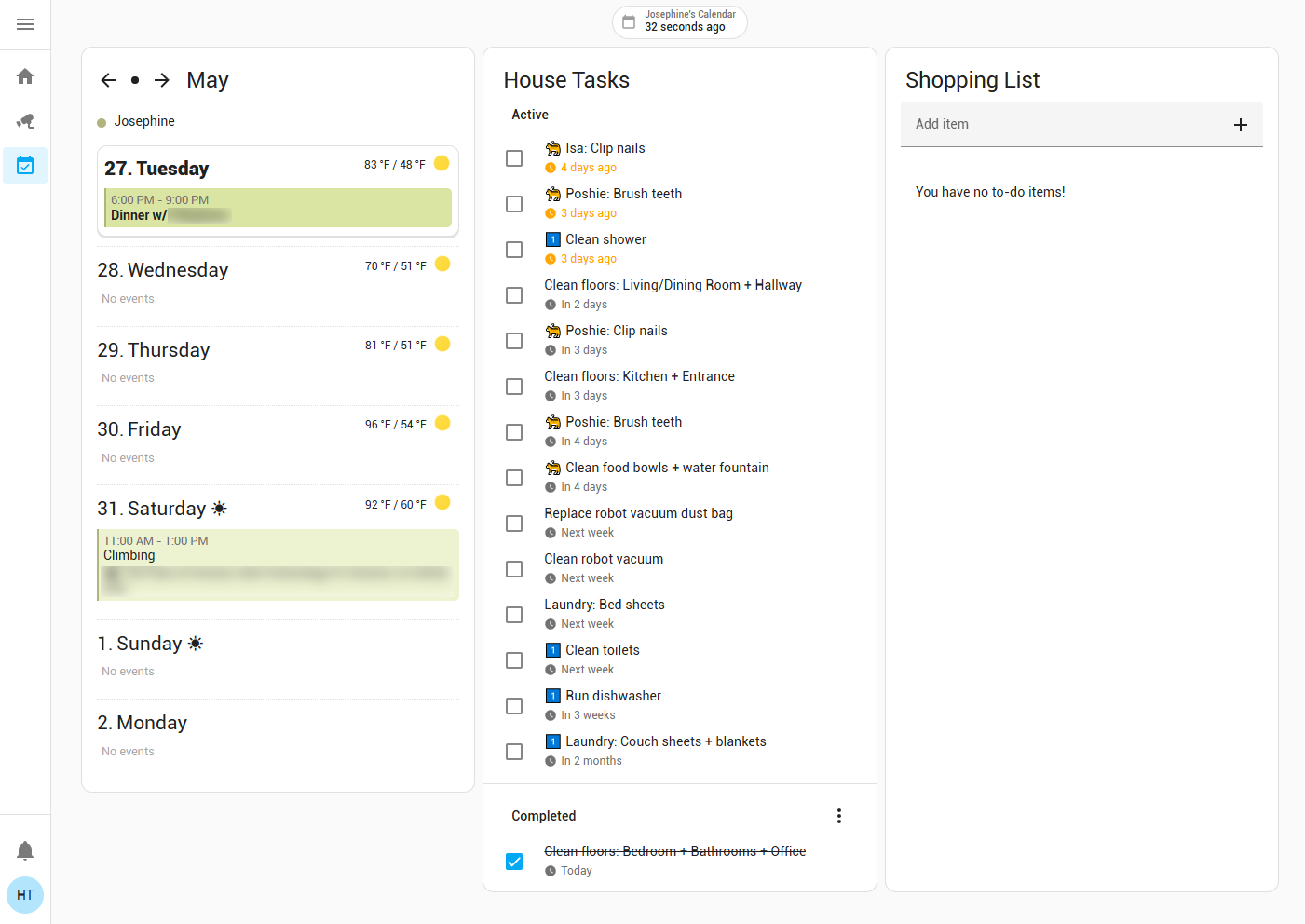
As you can see, it looks a bit chaotic. It's hard to tell what actually needs to be done today. So I'm working on a custom dashboard card to organize items by date (overdue, today, tomorrow, this week, future). I also need a better way to indicate ad-hoc tasks. In the example, I have them prefixed with "1️⃣" but I think that's kind of ugly, so I removed it. Not much progress yet on this yet.
More importantly, I created an automation to send notifications to my phone so at least I know what needs to be done today. Most of the tasks are for me anyway.
The automation has four triggers:
- When
update_itemfor "House Tasks" or "Personal Tasks" is fired - When
remove_itemfor "House Tasks" or "Personal Tasks" is fired - Every morning at 8:30 AM
- When
mobile_app_notification_action"done" is fired
Automation Triggers YAML
triggers:
    - alias: When update_item for "House Tasks" or "Personal Tasks" is fired
      trigger: event
      event_type: call_service
      event_data:
          domain: todo
          service: update_item
          service_data:
              entity_id:
                  - todo.house_tasks
                  - todo.personal_tasks
      id: updated
    - alias: When remove_item for "House Tasks" or "Personal Tasks" is fired
      trigger: event
      event_type: call_service
      event_data:
          data:
              domain: todo
              service: remove_item
              service_data:
                  entity_id:
                      - todo.house_tasks
                      - todo.personal_tasks
      id: removed
    - trigger: time
      at: '08:30:00'
      id: every morning
      enabled: true
      alias: Every morning at 8:30 AM
    - trigger: event
      event_type: mobile_app_notification_action
      event_data:
          action: done
      id: notification action done
      alias: When mobile_app_notification_action "done" is fired
And the action is a Choose block with an action for each trigger.
Across all actions, I assume that notifications have a tag in the format "{entity_id}:{uid}". This uniquely identifies each item so if an item is updated or reloaded, it won't be duplicated, and if an item is done or removed, the notification can be removed.
- If triggered by updated
- If status is changed to completed or due date is changed to after today, clear notification
- If status is changed to needs action, show notification
- If triggered by removed
- Clear notification
- If triggered by every morning
- Fetch all items for 'todo.housetasks' and 'todo.personaltasks' entities using the built-in "To-do list: Get items" action
- For each item that is not done yet and is due today or overdue, show notification
- For each item that is due after today, clear notification (this is just for cleanup, but generally shouldn't happen)
- If triggered by notification action done
- Change status to completed using the built-in "To-do list: Update item" action
- Do not explicitly clear the notification, it will be cleared after the item is actually updated and causes the first action to be triggered
Automation Actions YAML
actions:
    - choose:
          - conditions:
                - condition: trigger
                  id:
                      - updated
            sequence:
                - variables:
                      entity_id: '{{ trigger.event.data.service_data.entity_id[0] }}'
                      item:
                          uid: '{{ trigger.event.data.service_data.item }}'
                          summary: '{{ trigger.event.data.service_data.rename }}'
                          status: '{{ trigger.event.data.service_data.status }}'
                          due: '{{ trigger.event.data.service_data.due_date }}'
                - alias: Send/Clear notifications
                  if:
                      - alias: If item is pending AND item is due today or before today
                        condition: template
                        value_template: >-
                            {{ item.status == "needs_action" and (item.due == "" or
                            as_local(strptime(item.due, "%Y-%m-%d")) <= today_at()) }}
                        enabled: true
                  then:
                      - alias: Send notification
                        action: notify.mobile_app_admin
                        metadata: {}
                        data:
                            data:
                                group: |
                                    {{ state_attr(entity_id, 'friendly_name') }}
                                notification_icon: mdi:check-circle-outline
                                color: '#4b80ca'
                                sticky: true
                                tag: |
                                    {{ entity_id }}:{{ item.uid }}
                                clickAction: /events-tasks/tasks
                                actions:
                                    - action: done
                                      title: Done
                            title: '{{ item.summary }}'
                            message: ' '
                  enabled: true
                  else:
                      - alias: Clear notification
                        action: notify.mobile_app_admin
                        metadata: {}
                        data:
                            data:
                                tag: |
                                    {{ entity_id }}:{{ item.uid }}
                            message: clear_notification
          - conditions:
                - condition: trigger
                  id:
                      - removed
            sequence:
                - variables:
                      entity_id: '{{ trigger.event.data.service_data.entity_id[0] }}'
                      item:
                          uid: '{{ trigger.event.data.service_data.item }}'
                - alias: Clear notification
                  action: notify.mobile_app_admin
                  metadata: {}
                  data:
                      data:
                          tag: |
                              {{ entity_id }}:{{ item.uid }}
                      message: clear_notification
          - conditions:
                - condition: trigger
                  id:
                      - every morning
            sequence:
                - sequence:
                      - action: todo.get_items
                        target:
                            entity_id:
                                - todo.house_tasks
                                - todo.personal_tasks
                        data: {}
                        response_variable: response
                      - repeat:
                            sequence:
                                - variables:
                                      entity_id: |
                                          {{ repeat.item }}
                                - repeat:
                                      sequence:
                                          - variables:
                                                item: |
                                                    {{ repeat.item }}
                                          - alias: Send/Clear notifications
                                            if:
                                                - alias: >-
                                                      If item is pending AND item is due today or
                                                      before today
                                                  condition: template
                                                  value_template: >-
                                                      {{ item.status == "needs_action" and
                                                      as_local(strptime(item.due, "%Y-%m-%d")) <=
                                                      today_at() }}
                                                  enabled: true
                                            then:
                                                - alias: Send notification
                                                  action: notify.mobile_app_admin
                                                  metadata: {}
                                                  data:
                                                      data:
                                                          group: >
                                                              {{ state_attr(entity_id, 'friendly_name')
                                                              }}
                                                          notification_icon: mdi:check-circle-outline
                                                          color: '#4b80ca'
                                                          sticky: true
                                                          tag: |
                                                              {{ entity_id }}:{{ item.uid }}
                                                          clickAction: /events-tasks/tasks
                                                          actions:
                                                              - action: done
                                                                title: Done
                                                      title: '{{ item.summary }}'
                                                      message: ' '
                                            enabled: true
                                            else:
                                                - alias: Clear notification
                                                  action: notify.mobile_app_admin
                                                  metadata: {}
                                                  data:
                                                      data:
                                                          tag: |
                                                              {{ entity_id }}:{{ item.uid }}
                                                      message: clear_notification
                                      for_each: "{{ response[entity_id]['items'] }}"
                            for_each:
                                - todo.house_tasks
                                - todo.personal_tasks
          - conditions:
                - condition: trigger
                  id:
                      - notification action done
            sequence:
                - variables:
                      entity_id: |
                          {{ trigger.event.data.tag.split(':')[0] }}
                      item:
                          uid: |
                              {{ trigger.event.data.tag.split(':')[1] }}
                - action: todo.update_item
                  metadata: {}
                  data:
                      status: completed
                      item: '{{ item.uid }}'
                  target:
                      entity_id: '{{ entity_id }}'
      enabled: true
The automation is running is Queued mode so multiple changes can be handled. Could also be in Parallel mode, but I don't think I would really benefit from it. I'm mostly concerned with quickly marking multiple tasks as 'done' from notifications. I just need them to all go through, and I don't care if it's a little slow. Queued is probably easier to debug if there are issues.
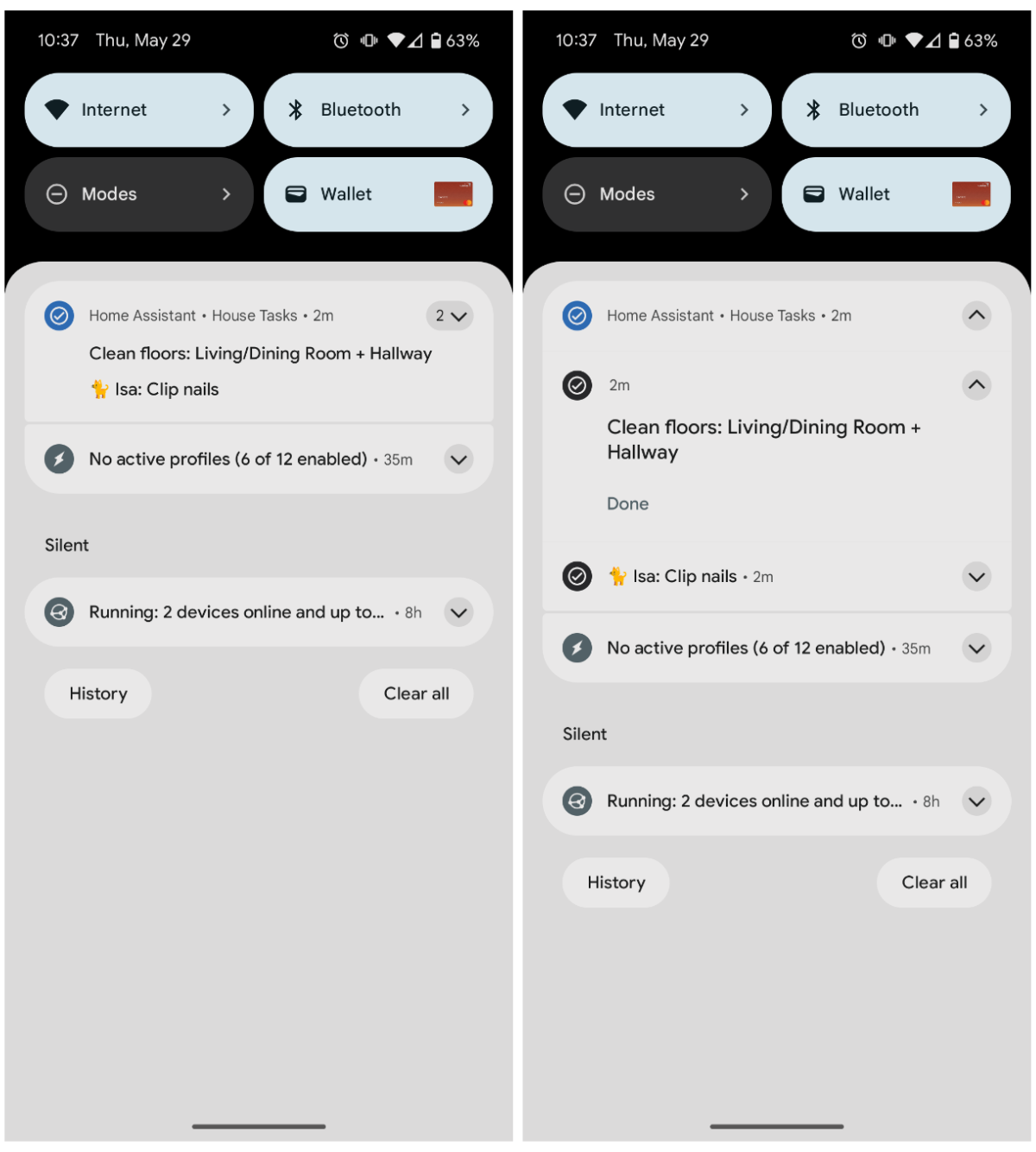
Finally, here's what the notifications look like on my phone.
Bedroom closet
My closet currently has wire shelving where the rod is part of the shelf. I actually hate it and have wanted to replace it. I want a smooth surface to slide things onto the shelf, and I want to be able to slide hangers back and forth easier. As it is now, the rod is broken up into segments of 6-12 inches.
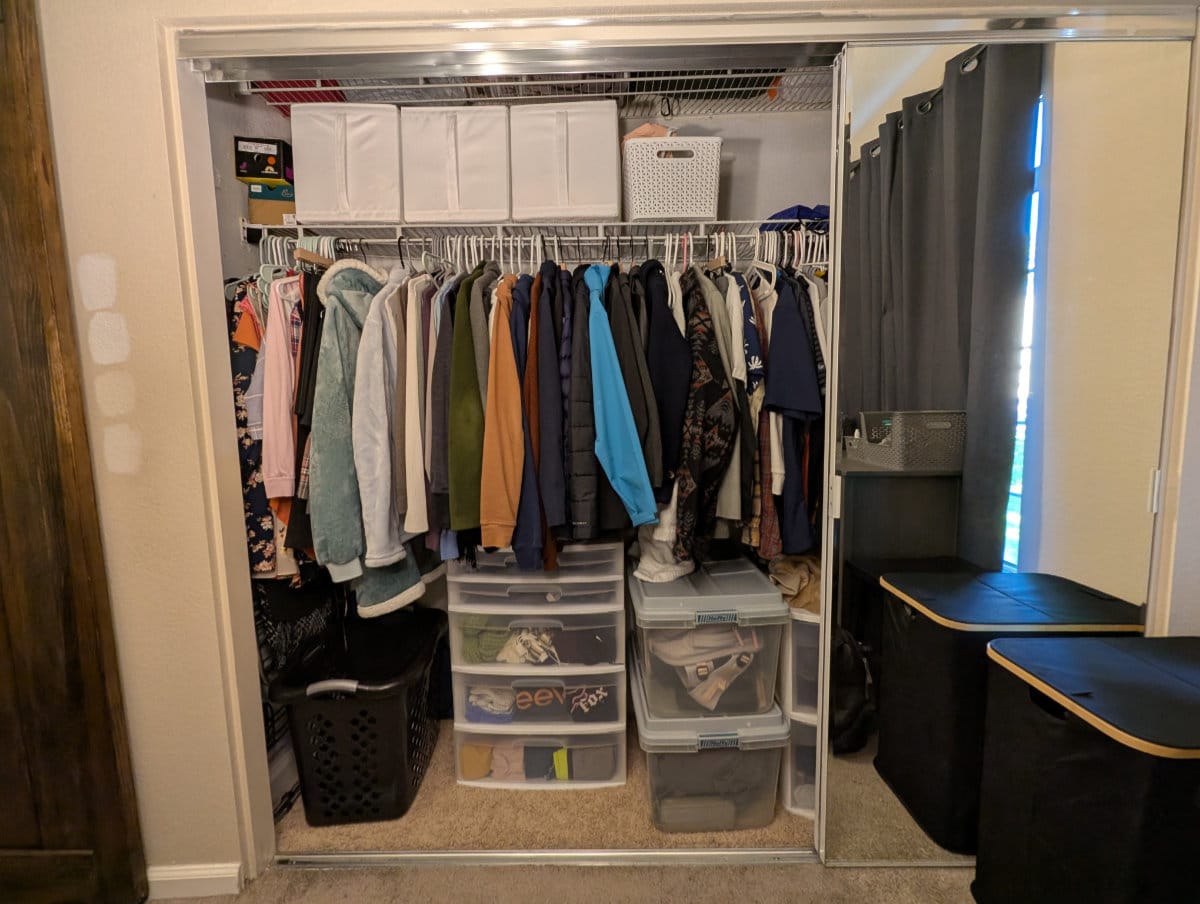
From afar, it looks fine. But when you look up close, you can see that the shelf isn't secured to anything......
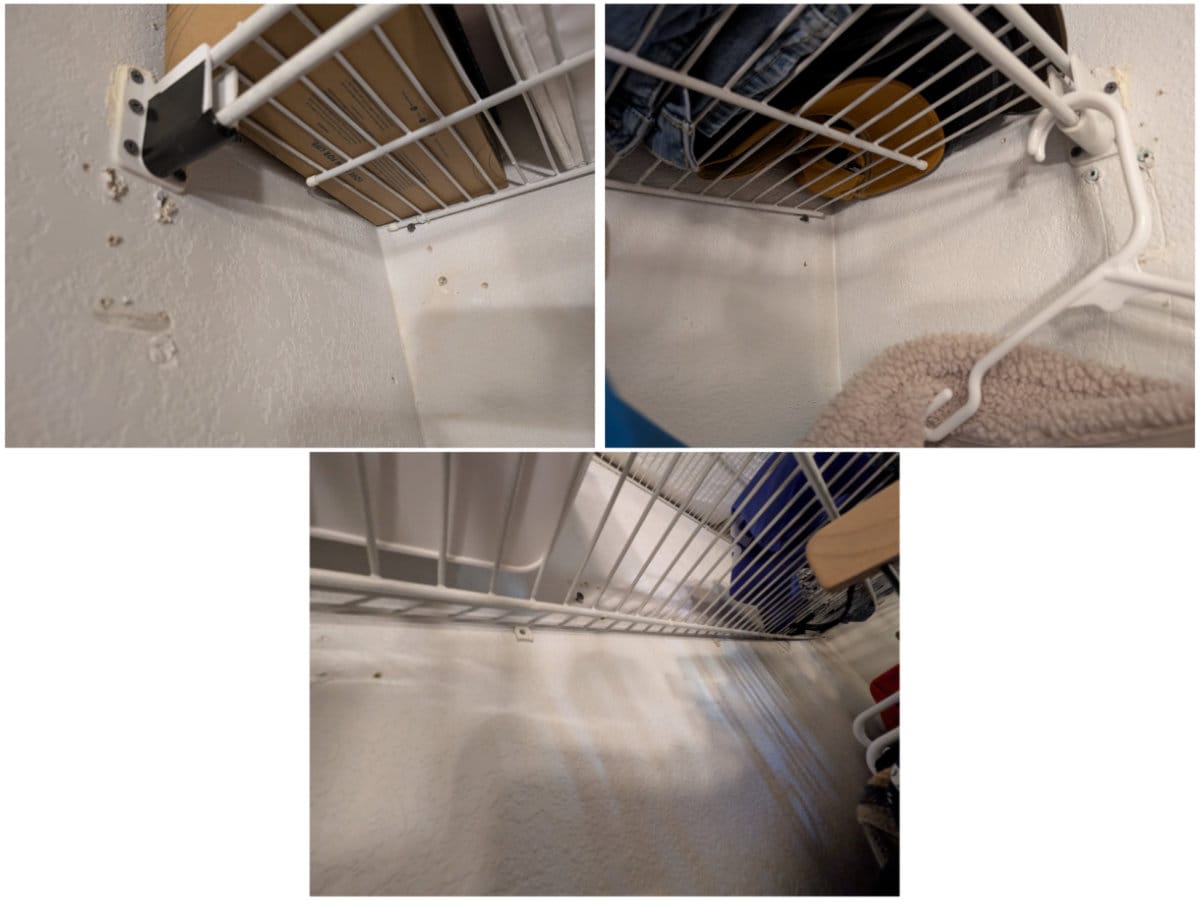
I think it must have been secured before, but it fell down at some point and the previous owners just propped it up on the screws instead of actually fixing it. I suppose it did work until this week.
So my plan this week is to make a design in SketchUp and buy the materials. I probably just need a few primed pine boards, a rod, and rod mounting hardware. (I also need to measure my car to see what can fit in it.) The closet is about 8 feet wide. The main thing I need to figure out is if I want one long rod supported in the middle, and how I will support it, or if I'll have two separate rods.
Then the week after, I hope I can get the actual closet work done in two days (so our clothes will not be homeless for too long). I'll patch the holes, but I won't repaint the whole thing. Although I do want to repaint it at some point because the previous owners painted it light purple for some reason, which doesn't match anything, and they didn't even paint the whole closet. There's also a second shelf higher up that you can't see in the pictures, which I will leave alone.
I am both excited and stressed. Wish me luck.